Mastering Digital Wellness: Reduce Screen Time by 25% for 2026

In an increasingly hyper-connected world, the glow of screens has become an inescapable part of our daily lives. From the moment we wake up to the last moments before sleep, our eyes are often glued to smartphones, tablets, computers, and televisions. While technology offers unparalleled convenience and connectivity, excessive screen time has been linked to a myriad of negative consequences, including eye strain, sleep disturbances, reduced attention spans, and even mental health challenges. As we look towards 2026, the imperative to cultivate healthier digital habits has never been more critical. This comprehensive guide will equip you with the knowledge and actionable strategies to leverage powerful digital wellness tools and reduce your screen time by a significant 25%, fostering a more balanced, productive, and fulfilling life.
The concept of digital wellness extends beyond simply cutting down on screen time; it’s about intentional engagement with technology. It involves understanding your digital habits, setting boundaries, and using technology as a tool to enhance your life, rather than allowing it to dictate your every moment. Achieving a 25% reduction in screen time might seem ambitious, but with the right approach and the strategic implementation of various digital wellness tools, it is an entirely attainable goal. This journey isn’t about deprivation; it’s about liberation – reclaiming your time, focus, and mental space.
Understanding Your Current Digital Footprint: The First Step Towards Reduction
Before you can effectively reduce your screen time, you must first understand where your time is currently being spent. Many of us are unaware of the true extent of our digital consumption. The first crucial step in our 25% reduction plan for 2026 is to gain a clear, honest picture of your current digital footprint. This involves tracking your usage across all devices and identifying your primary digital time sinks.
Why Track Your Screen Time?
- Awareness: It provides a baseline and highlights unconscious habits. You might be surprised by how many hours you spend on certain apps or activities.
- Identification of Triggers: Tracking helps you pinpoint situations or emotions that lead to excessive screen use (e.g., boredom, stress, social media addiction).
- Goal Setting: With concrete data, you can set realistic and measurable goals for reduction.
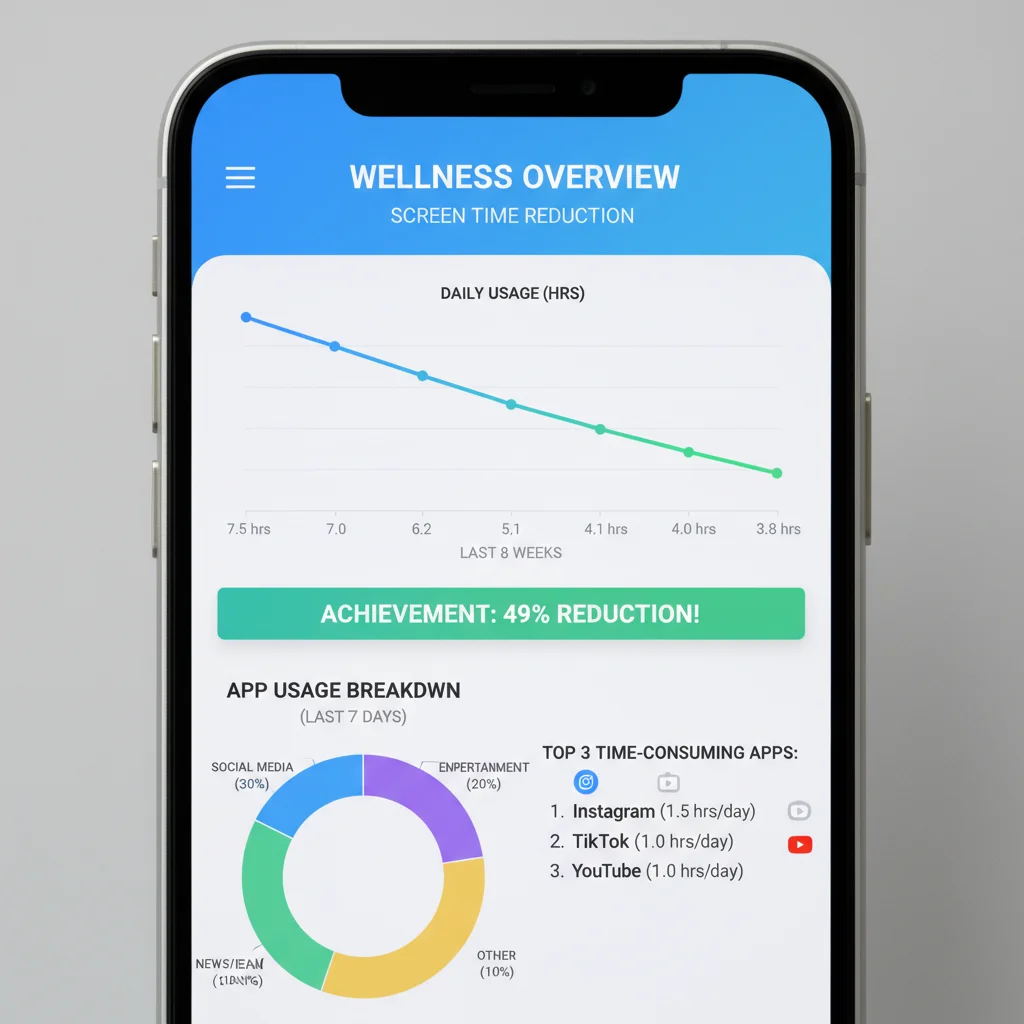
- Motivation: Seeing progress over time can be a powerful motivator to stick to your plan.
Initial Assessment: Manual Tracking vs. Automated Digital Wellness Tools
You can begin with a simple manual tracking method for a few days, noting down whenever you pick up a device and for how long. However, for a more accurate and less intrusive approach, automated digital wellness tools are invaluable. Both iOS (Screen Time) and Android (Digital Wellbeing) offer built-in features that meticulously track your device usage. These tools provide detailed breakdowns of:
- Total screen time per day/week.
- Usage per application category (social networking, entertainment, productivity).
- Number of times you pick up your phone.
- Notifications received from each app.
Third-party apps like Forest, Freedom, and RescueTime also offer advanced tracking and blocking functionalities, which we’ll delve into later. For now, focus on using your phone’s native features to gather data for at least one full week. This data will form the foundation of your personalized screen time reduction strategy.
Setting Realistic Goals and Establishing Boundaries with Digital Wellness Tools
Once you have a clear understanding of your current screen time, the next step is to set realistic and achievable goals. Our target is a 25% reduction by 2026, but this doesn’t mean you have to achieve it overnight. Break it down into smaller, manageable increments. For example, aim for a 5% reduction each quarter, or focus on specific apps where you spend the most time.
Defining Your ‘Why’
Before you even touch any digital wellness tools, clearly define your ‘why’. Why do you want to reduce screen time? Is it to improve sleep, increase productivity, spend more quality time with loved ones, or simply enjoy life beyond the digital realm? Having a strong ‘why’ will be your anchor when temptation strikes.
Leveraging Built-in Digital Wellness Tools for Goal Setting
Both Apple’s Screen Time and Google’s Digital Wellbeing offer features that are perfect for setting boundaries:
- App Limits: You can set daily time limits for specific apps or categories of apps. For instance, if you spend 3 hours a day on social media, set a limit of 2 hours and 15 minutes (a 25% reduction). Once the limit is reached, the app will be blocked, prompting you to reconsider your usage. This is one of the most effective digital wellness tools for immediate impact.
- Downtime/Focus Mode: Schedule specific periods when only essential apps (like phone calls) are available. This is invaluable for evenings, mealtimes, or before bed.
- Always Allowed Apps: Designate apps that are always available, even during downtime or when limits are reached (e.g., maps, health apps).
Creating a ‘No-Screen’ Zone and Time
Designate specific areas in your home or specific times of the day as ‘no-screen’ zones or times. This could include:
- The bedroom: Make it a sanctuary for sleep and relaxation, free from digital distractions.
- Dining table: Encourage mindful eating and conversation without screens.
- The first hour after waking up and the last hour before bed: Use this time for reading, meditation, or quiet reflection instead of immediate digital engagement.
Physical separation can be a powerful deterrent. Keep your phone in another room during these designated times. This simple act, supported by your intention and understanding of your ‘why’, can significantly contribute to your 25% reduction goal.
Strategic Use of Third-Party Digital Wellness Tools
While built-in features are a great start, a range of specialized third-party digital wellness tools can offer more robust control, advanced insights, and unique motivational elements to help you achieve your 25% screen time reduction.
Blocking and Productivity Apps
- Freedom: This cross-device app allows you to block distracting websites and apps across your phone, tablet, and computer for set periods. It’s excellent for focused work sessions or ensuring complete digital detoxes during specific hours. Its synchronized blocking across multiple devices makes it an incredibly powerful tool for comprehensive screen time management.
- RescueTime: More than just a blocker, RescueTime tracks your activity on computers and mobile devices, categorizes your usage (e.g., productive, distracting, neutral), and provides detailed reports. It can also block distractions when you need to focus, making it a powerful analytics and control tool to reduce screen time.
- Cold Turkey: Similar to Freedom, Cold Turkey is particularly aggressive in blocking distractions on your computer. It can even prevent you from uninstalling it during a locked session, making it ideal for those who struggle with self-control.
Mindfulness and Habit-Building Apps
- Forest: This unique app uses a gamified approach to encourage focus. When you want to focus, you plant a virtual tree. If you leave the app to check social media, your tree withers. Successfully completing focus sessions grows a forest, and the app even partners with a real tree-planting organization, adding a tangible positive impact to your efforts. It’s a fantastic motivator among digital wellness tools for staying off your phone.
- Moment: This app tracks your family’s screen time, allowing you to set daily limits and even ‘force’ yourself or family members off devices when limits are reached. It’s particularly useful for households looking to collectively reduce screen time.
- Calm/Headspace: While not directly screen-time reduction apps, these mindfulness and meditation apps can help address the underlying reasons for excessive screen use, such as stress or anxiety. By providing alternative coping mechanisms and promoting mental well-being, they indirectly support your goal of less screen time.
Notification Management
Notifications are one of the biggest culprits of excessive phone usage. Each buzz or ding pulls you back into your device, often leading to prolonged, unintentional screen time. Most digital wellness tools, including built-in phone settings, offer robust notification management:
- Turn off non-essential notifications: Be ruthless. Do you really need to be notified every time someone likes your post or a new email arrives?
- Batch notifications: For apps you need, consider setting notifications to deliver silently or at specific times.
- Use ‘Do Not Disturb’ modes: Schedule these modes during work, family time, or sleep.
Cultivating New Habits and Offline Activities
Reducing screen time isn’t just about what you stop doing; it’s crucially about what you start doing instead. The void left by less screen time needs to be filled with enriching and engaging offline activities. This is where the true essence of digital wellness comes into play – fostering a life that thrives beyond the digital realm.
Embracing Hobbies and Interests
Reconnect with old hobbies or explore new ones. This could be anything from reading physical books, painting, playing a musical instrument, gardening, cooking, or learning a new language. The key is to find activities that genuinely engage you and provide a sense of accomplishment or relaxation.
Prioritizing Face-to-Face Interactions
Make a conscious effort to spend more quality time with family and friends without the distraction of screens. Suggest screen-free dinners, board game nights, or outdoor activities. These interactions are vital for mental well-being and can significantly reduce the urge to constantly check your phone.
Spending Time in Nature
Numerous studies highlight the benefits of spending time outdoors. A simple walk in the park, a hike, or even just sitting in your backyard can reduce stress, improve mood, and provide a much-needed break from digital stimuli. Make it a regular part of your routine.
Mindfulness and Meditation
As mentioned earlier, apps like Calm and Headspace can be beneficial, but you can also practice mindfulness without a screen. Simple breathing exercises, body scans, or mindful observation of your surroundings can help you stay present and reduce the impulse to reach for your device out of habit or boredom. These practices, while not direct digital wellness tools, are powerful allies in the fight against excessive screen time.
Optimizing Your Digital Environment for Reduced Usage
Beyond specific apps and blocking features, making subtle changes to your device settings and digital environment can significantly influence your screen time. These small adjustments, when combined, create a powerful ecosystem that nudges you towards a 25% reduction.
Declutter Your Digital Space
- Delete unused apps: Go through your phone and remove any apps you haven’t used in a month or more. Less clutter means fewer potential distractions.
- Organize your home screen: Place essential apps on your first home screen and bury distracting apps (social media, games) in folders or on subsequent screens. The extra effort required to find them can deter impulsive usage.
- Turn off auto-play: Many streaming services and social media platforms auto-play videos, pulling you into endless scrolling. Disable this feature whenever possible.
Grayscale Mode
Most smartphones offer a grayscale mode (often found in accessibility settings). Switching your screen to black and white can make your phone less appealing and addictive. The vibrant colors of apps are designed to capture attention and stimulate dopamine, so removing them can significantly reduce your urge to engage.
Charging Habits
Avoid charging your phone in your bedroom, especially next to your bed. This simple change can prevent late-night scrolling and improve sleep quality. Invest in a traditional alarm clock to remove the need for your phone in the bedroom entirely. This is a subtle yet effective strategy for reducing screen time, particularly before sleep.
Leveraging Browser Extensions for Desktop/Laptop
Many of the principles for mobile devices also apply to computers. Browser extensions can act as powerful digital wellness tools for your desktop environment:
- Website blockers: Extensions like StayFocusd (Chrome) or LeechBlock NG (Firefox) allow you to block specific websites during certain hours or after you’ve spent a set amount of time on them.
- News Feed Eradicators: Extensions that remove social media news feeds can help you check specific profiles or messages without getting sucked into endless scrolling.
The Importance of Regular Review and Adjustment
Achieving a 25% reduction in screen time by 2026 is not a one-time fix; it’s an ongoing process of self-awareness, adjustment, and commitment. Regularly reviewing your progress and adapting your strategies is crucial for long-term success.
Weekly Check-ins
Dedicate a few minutes each week to review your screen time data from your phone’s built-in digital wellness tools or third-party apps. Ask yourself:
- Am I meeting my daily/weekly goals?
- Which apps are still consuming too much of my time?
- What triggers led to excessive use this week?
- What strategies worked well, and what didn’t?
Celebrate Small Victories
Acknowledge and celebrate your progress, no matter how small. Did you stick to your app limits for a full day? Did you have a screen-free dinner? Reinforcing positive behavior through self-recognition can boost your motivation to continue. The journey to reducing screen time by 25% is a marathon, not a sprint, and celebrating milestones keeps you engaged.
Be Kind to Yourself
There will be days when you exceed your limits or fall back into old habits. Don’t let a slip-up derail your entire effort. Acknowledge it, learn from it, and recommit to your goals. Digital wellness is about progress, not perfection.

Addressing the Psychological Aspect: Why We Overuse Screens
To truly achieve a sustainable 25% reduction in screen time, it’s essential to understand the psychological underpinnings of why we overuse our devices. Many digital wellness tools focus on external controls, but addressing internal drivers is equally important.
Fear of Missing Out (FOMO)
Social media often fuels FOMO, making us feel compelled to constantly check for updates. Recognize that much of what you see online is curated and often doesn’t reflect the full reality. Focus on your own life and experiences rather than comparing yourself to others online.
Boredom and Restlessness
In a world of instant gratification, boredom can feel uncomfortable. Our phones offer an immediate escape. Instead of reaching for your device, try embracing boredom as an opportunity for creativity, reflection, or simply being present. Keep a book or a journal handy for these moments.
Stress and Anxiety Relief
Some people turn to screens as a way to cope with stress or anxiety. While a temporary distraction, it often exacerbates these feelings in the long run. Explore healthier coping mechanisms like exercise, meditation, talking to a friend, or engaging in a relaxing hobby. Integrating these practices into your routine can reduce your reliance on screens for emotional regulation.
The Dopamine Loop
Apps are designed to create dopamine feedback loops, making them highly addictive. Likes, notifications, and new content provide small bursts of dopamine, reinforcing the behavior. Understanding this mechanism can help you break free from its grasp. Recognize when you’re caught in a loop and consciously choose to disengage.
Creating a Supportive Environment
Your environment plays a significant role in your digital habits. Cultivating a supportive environment, both physical and social, can greatly aid your efforts to reduce screen time by 25%.
Communicate Your Goals
Share your screen time reduction goals with family, friends, and even colleagues. When others are aware of your intentions, they can offer support and understanding, and perhaps even join you in the endeavor. This can also help reduce the pressure to respond immediately to messages or engage in digital conversations.
Digital Detox Challenges
Consider participating in or initiating digital detox challenges with friends or family. This could be a ‘no-phone Sunday’ or a ‘tech-free weekend’. Collective efforts can be highly motivating and provide a sense of shared accomplishment.
Physical Environment Adjustments
Beyond charging habits, consider how your physical space encourages or discourages screen use. Arrange your living room to promote conversation or reading rather than just TV viewing. Keep books, board games, or craft supplies easily accessible to serve as appealing alternatives to screens.
The Long-Term Benefits of Reduced Screen Time
Achieving a 25% reduction in screen time by 2026 is more than just a numerical goal; it’s a commitment to a healthier, more present, and more fulfilling life. The benefits of cultivating better digital wellness are profound and far-reaching:
- Improved Mental Health: Reduced anxiety, stress, and symptoms of depression; enhanced mood and emotional stability.
- Better Sleep Quality: Less exposure to blue light before bed leads to easier falling asleep and more restorative sleep.
- Increased Productivity and Focus: Fewer distractions mean you can concentrate better on tasks, leading to higher quality work and greater efficiency.
- Stronger Relationships: More present and meaningful interactions with loved ones, fostering deeper connections.
- Enhanced Physical Health: More time for physical activity, less eye strain, and potentially reduced sedentary behavior.
- Greater Creativity and Mindfulness: More opportunities for reflection, imagination, and engagement with the real world.
- Reclaimed Time: Discovering hours you didn’t know you had, allowing you to pursue passions, learn new skills, or simply relax without digital demands.
Conclusion: A Balanced Digital Life for 2026 and Beyond
The journey to reducing your screen time by 25% in 2026 using effective digital wellness tools is a powerful step towards a more intentional and balanced life. It’s a testament to your commitment to well-being in an increasingly digital landscape. By understanding your habits, setting clear goals, strategically using built-in and third-party digital wellness tools, cultivating enriching offline activities, and fostering a supportive environment, you can reclaim significant portions of your day and enhance your overall quality of life.
Remember, this isn’t about demonizing technology; it’s about mastering it. It’s about using screens as powerful tools when needed, but consciously choosing to disengage when they no longer serve your best interests. Embrace this challenge with an open mind and a willingness to experiment. The rewards – greater focus, deeper connections, improved health, and a renewed sense of presence – are well worth the effort. Start today, track your progress, and look forward to a healthier, happier, and more digitally balanced 2026.