Master AI Productivity Tools in 3 Months: Boost Workflow 20% by Spring 2026

Master AI Productivity Tools in 3 Months: An Insider’s Guide to Boosting Your Workflow by 20% by Spring 2026
In today’s fast-paced professional landscape, the ability to maximize efficiency is no longer a luxury but a necessity. As we hurtle towards Spring 2026, the promise of a 20% boost in workflow seems ambitious, yet entirely achievable with the strategic adoption and mastery of AI productivity tools. Artificial Intelligence is transforming how we work, offering unprecedented opportunities to automate mundane tasks, streamline complex processes, and enhance decision-making. This comprehensive guide is designed to be your roadmap, detailing a three-month intensive plan to not only integrate these powerful tools into your daily routine but to truly master them, ensuring you reap the full benefits of an AI-enhanced workflow.
The digital revolution has brought us to a point where traditional methods of productivity are being rapidly outpaced. Manual data entry, repetitive scheduling, and inefficient communication are becoming relics of the past. Enter AI productivity tools – a new breed of software designed to augment human capabilities, allowing professionals to focus on higher-value tasks that require creativity, critical thinking, and interpersonal skills. But simply knowing these tools exist isn’t enough; the real challenge lies in effectively incorporating them, understanding their nuances, and optimizing their usage to achieve tangible improvements in productivity.
This article will delve into a structured, month-by-month approach, providing actionable insights, practical tips, and a clear pathway to becoming proficient in leveraging AI for a significant workflow uplift. We’ll explore everything from identifying the right tools for your specific needs to advanced integration strategies and continuous optimization. By the end of this guide, you’ll have a clear understanding of how to make AI your most powerful ally in the quest for unparalleled professional efficiency.
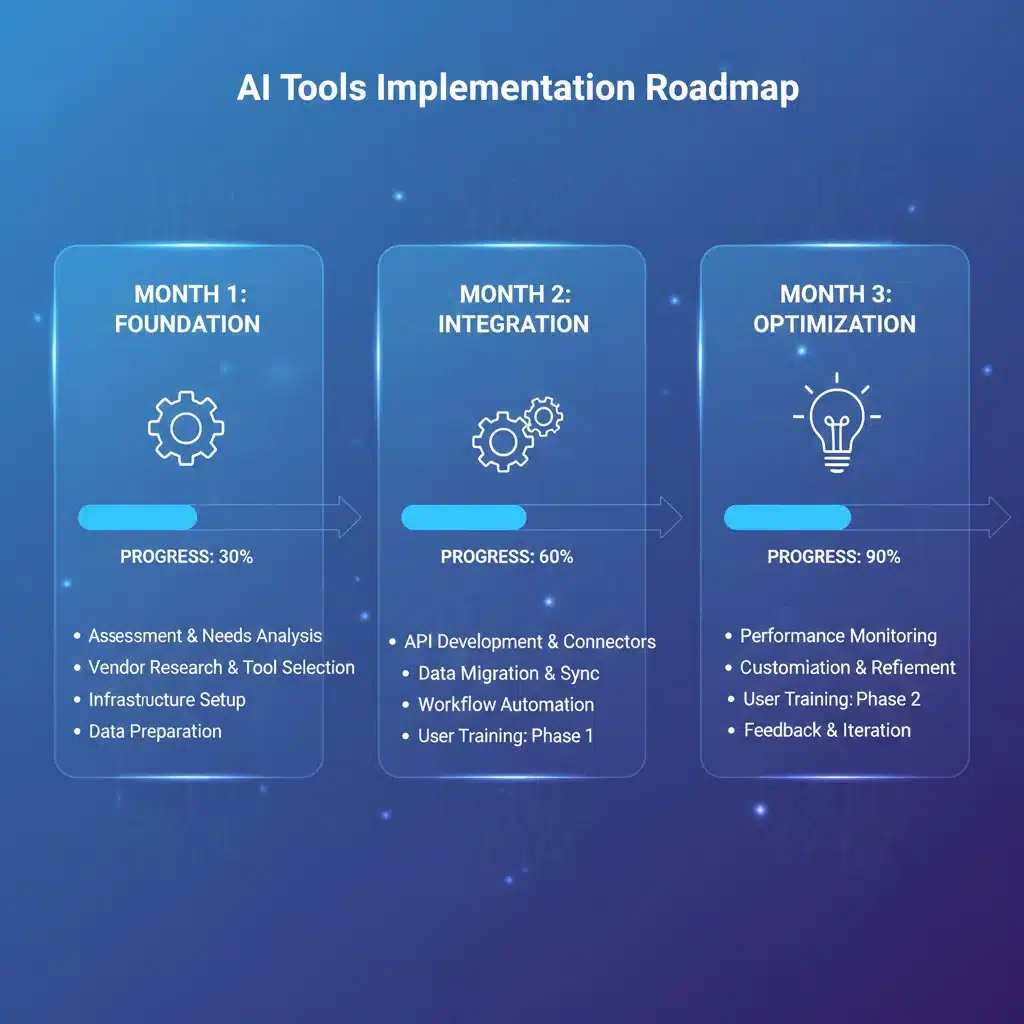
Month 1: Laying the Foundation – Understanding and Selecting Your AI Productivity Tools
The first month of your journey is all about exploration, understanding, and strategic selection. It’s crucial to lay a solid foundation by identifying your current workflow bottlenecks and matching them with the right AI productivity tools. This isn’t a one-size-fits-all approach; the best tools for you will depend on your industry, role, and specific challenges.
Identifying Your Productivity Gaps
Before you even think about software, take a critical look at your current workflow. Where do you lose time? What tasks are repetitive, tedious, or prone to human error? Common areas include email management, scheduling, data analysis, content creation, project management, and customer support. Document these pain points thoroughly. Understanding your exact needs will prevent you from investing in tools that don’t address your core problems.
- Email Overload: Are you spending hours sifting through emails?
- Scheduling Conflicts: Do meetings take forever to set up?
- Repetitive Data Entry: Is manual input consuming your day?
- Content Creation: Do you struggle with writer’s block or generating ideas?
- Project Management: Are tasks falling through the cracks?
Exploring the Landscape of AI Productivity Tools
The market for AI productivity tools is vast and growing. It can be overwhelming, so focus on categories relevant to your identified gaps. Here’s a breakdown of popular categories and examples:
- AI Writing Assistants: Tools like Jasper, Copy.ai, and Grammarly Business can automate content generation, refine prose, and even generate ideas for marketing copy, emails, or reports. They significantly reduce the time spent on drafting and editing.
- AI Scheduling & Calendar Tools: Calendly (with AI features), X.ai, and Reclaim.ai can automatically find optimal meeting times, send invites, and even reschedule based on changing priorities. This eliminates the back-and-forth email chains associated with scheduling.
- AI Project Management & Task Automation: Platforms like Asana, Trello, and Monday.com are integrating AI to automate task assignments, predict project delays, analyze team performance, and prioritize workloads. Tools like Zapier and Make (formerly Integromat) use AI to connect various apps and automate multi-step workflows.
- AI Data Analysis & Business Intelligence: Tableau, Power BI, and specialized AI platforms can process vast datasets, identify trends, generate reports, and provide actionable insights far faster than manual analysis. This empowers better, data-driven decision-making.
- AI Note-Taking & Transcription: Otter.ai, Fathom, and Scribe automatically transcribe meetings, summarize key points, and identify action items, freeing you from manual note-taking during calls.
- AI Personal Assistants: Advanced virtual assistants can manage emails, schedule appointments, conduct research, and even handle customer inquiries, acting as a force multiplier for individual professionals.
Selection Criteria and Pilot Programs
Once you have a shortlist, it’s time to evaluate. Consider the following:
- Relevance: Does it directly address one of your identified pain points?
- Ease of Use: Is the interface intuitive? Will there be a steep learning curve?
- Integration: Does it integrate with your existing software ecosystem (CRM, email client, project management tools)?
- Scalability: Can it grow with your needs?
- Cost-Benefit: Does the potential time and efficiency saving justify the cost? Many tools offer free trials, which are invaluable for testing.
- Security & Privacy: Especially important for sensitive data. Ensure compliance with relevant regulations.
Start with one or two tools that promise the most immediate impact. Implement them in a pilot program. For instance, if email management is your biggest hurdle, try an AI email assistant for a week. Monitor its performance, gather feedback, and adjust as needed. This iterative approach minimizes disruption and maximizes your chances of success.
Key takeaway for Month 1: Don’t rush into subscriptions. Understand your needs, research thoroughly, and start small with pilot programs to validate your choices. The goal is to build a foundational understanding of what AI productivity tools can do for you and select the ones that offer the best fit.
Month 2: Integration and Customization – Weaving AI into Your Daily Workflow
With your chosen AI productivity tools in hand, Month 2 is dedicated to deep integration and customization. This is where you move beyond basic usage and start molding these tools to fit your unique workflow, maximizing their potential to boost efficiency.
Seamless Integration with Existing Systems
The true power of AI productivity tools often lies in their ability to communicate with each other and with your existing software. Look for native integrations or use automation platforms like Zapier or Make (formerly Integromat) to create custom workflows. For example:
- Connect your AI scheduler to your CRM to automatically log meeting details.
- Link your AI writing assistant to your project management tool to draft task descriptions or update statuses.
- Automate data transfer from an AI-powered data analysis tool directly into your reporting dashboards.
This interconnectedness reduces manual effort, eliminates data silos, and ensures a smooth flow of information across your digital ecosystem. Spend time exploring the integration capabilities of each tool and experiment with different connections.
Customization for Optimal Performance
Generic settings rarely yield optimal results. AI productivity tools are most effective when tailored to your specific preferences and tasks. Dive into the settings and customization options:
- AI Writing Tools: Train them on your brand’s voice, tone, and specific terminology. Create custom templates for common document types (emails, reports, social media posts).
- AI Schedulers: Define your availability, preferred meeting lengths, buffer times, and even prioritize certain types of meetings or contacts.
- AI Project Management: Customize dashboards to display the most relevant metrics, set up automated notifications for critical deadlines, and configure AI-driven task prioritization rules based on your project criteria.
- AI Data Analysis: Refine the parameters for data queries, set up custom alerts for anomalies, and personalize report formats to highlight key insights relevant to your objectives.
The more you customize, the more these tools will feel like a natural extension of your own capabilities, rather than a separate system you have to manage.
Data Migration and Training
For AI tools to be truly effective, they often need access to your data. This could involve migrating existing documents, emails, or project data. Ensure this process is secure and organized. Furthermore, many AI tools learn over time. The more you use them and provide feedback, the smarter and more accurate they become. Actively ‘train’ the AI by correcting its outputs, providing clear instructions, and consistently using its features. This feedback loop is crucial for long-term mastery.
Establishing New Habits and Workflows
Integrating new tools requires a shift in habits. Actively incorporate the AI tools into your daily routines. For example, instead of manually scheduling a meeting, make it a habit to use your AI scheduler. Instead of writing an email from scratch, start with your AI writing assistant. This intentional practice will solidify the new workflows and make the use of AI productivity tools second nature.
Key takeaway for Month 2: Focus on making your selected AI tools an integral part of your digital environment. Leverage integrations and customization options to create a seamless, personalized, and highly efficient workflow. Consistent use and feedback are vital for the AI to learn and improve.
Month 3: Optimization and Advanced Strategies – Maximizing Your 20% Workflow Boost
By Month 3, you should be comfortable with your chosen AI productivity tools. This final phase is about refining your usage, exploring advanced features, and continuously optimizing your workflow to achieve and even surpass your 20% productivity boost goal by Spring 2026.
Performance Monitoring and Adjustment
The first step in optimization is to measure. How much time are you actually saving? Are tasks being completed faster? Are you making better decisions? Use built-in analytics from your AI tools or track your own time to quantify the improvements. Identify areas where the tools are performing exceptionally well and where there might still be room for improvement. For instance:
- If your AI writing assistant is great for initial drafts but struggles with specific industry jargon, consider creating a custom glossary for it.
- If your AI scheduler is occasionally booking meetings at suboptimal times, review its learning parameters or adjust your availability settings.
This continuous feedback loop is essential for maximizing the benefits of AI productivity tools.
Exploring Advanced Features and Cross-Tool Synergy
Most AI productivity tools have advanced features that go beyond basic functionality. Dedicate time to explore these: conditional automations, advanced reporting, custom AI models, or deeper integrations. Look for opportunities to create synergy between different tools. For example, can your AI transcription tool automatically feed summaries into your AI project management system, which then triggers an AI writing assistant to draft follow-up emails? The possibilities for chaining AI capabilities are vast.
Delegation to AI and Strategic Focus
As you become more adept at leveraging AI productivity tools, you’ll find yourself able to ‘delegate’ more complex and time-consuming tasks to them. This frees up your mental energy and time to focus on strategic initiatives, creative problem-solving, and tasks that genuinely require human ingenuity. This is where the 20% workflow boost truly materializes – not just in doing things faster, but in doing more impactful work.
- Re-evaluate your role: What can AI now handle that you used to do?
- Focus on high-value tasks: Direct your freed-up time towards innovation, leadership, and relationship building.
- Strategic planning: Utilize AI’s data analysis capabilities to inform your long-term goals and strategies.
Staying Updated and Future-Proofing Your Workflow
The field of AI is evolving at an astonishing pace. New AI productivity tools emerge constantly, and existing ones receive frequent updates. Make it a habit to stay informed about new developments. Subscribe to industry newsletters, follow AI blogs, and participate in online communities. Regularly review your toolset to ensure it remains cutting-edge and continues to meet your evolving needs. Future-proofing your workflow means being adaptable and open to incorporating even more advanced AI capabilities as they become available.

Overcoming Challenges and Ethical Considerations
While the benefits are immense, be mindful of potential challenges. Data privacy, security, and the ethical implications of AI use are paramount. Always ensure you understand how your data is being used and stored by these tools. Also, remember that AI is a tool to augment, not replace, human intelligence. Maintain a critical eye on AI-generated outputs and ensure they align with your standards and values.
Key takeaway for Month 3: Continuously monitor, optimize, and expand your use of AI tools. Explore advanced features, delegate more tasks to AI, and stay abreast of new developments to ensure your workflow remains at peak efficiency. This ongoing commitment will secure and even amplify your 20% productivity boost.
The Future of Work: Sustaining Your AI-Powered Efficiency Beyond Spring 2026
Achieving a 20% workflow boost by Spring 2026 is an ambitious yet entirely attainable goal when you commit to mastering AI productivity tools. This three-month guide provides a structured pathway, but the journey towards peak efficiency is continuous. The landscape of AI is ever-evolving, and your ability to adapt, learn, and integrate new technologies will be the cornerstone of sustained success.
Continuous Learning and Adaptation
The most effective professionals in the AI era will be those who embrace continuous learning. Regularly seek out new tutorials, webinars, and courses on your chosen AI tools. Engage with user communities to learn best practices and discover innovative applications. As new features are rolled out, make it a priority to understand how they can further enhance your workflow. This proactive approach ensures that your skills remain relevant and your productivity continuously improves.
Building an AI-First Mindset
Beyond specific tools, cultivating an ‘AI-first’ mindset is crucial. This means approaching tasks and challenges with the question: “How can AI help me do this better, faster, or more efficiently?” It’s about seeing AI not as a threat, but as an indispensable partner in your professional endeavors. This mindset shift will naturally lead you to explore and adopt new AI productivity tools as they emerge, keeping you at the forefront of efficiency.
Sharing Knowledge and Fostering Collaboration
Don’t keep your AI mastery to yourself. Share your insights and successes with colleagues and your team. By fostering a culture of AI adoption, you can amplify the collective productivity of your entire organization. Train others, create internal best practices, and collaborate on finding new ways to integrate AI into shared workflows. A rising tide lifts all boats, and collective AI literacy can lead to exponential gains across the board.
The Broader Impact of AI Productivity Tools
The benefits of mastering AI productivity tools extend beyond individual efficiency. They contribute to reduced operational costs, faster project completion times, improved decision-making through better data analysis, and ultimately, a more agile and competitive organization. By offloading repetitive and time-consuming tasks to AI, human talent is freed up to concentrate on strategic thinking, creativity, and interpersonal interactions – areas where human intelligence truly shines.
Conclusion: Your Path to AI-Powered Productivity
The journey to mastering AI productivity tools and achieving a 20% workflow boost by Spring 2026 is an investment in your future professional success. By following this three-month insider’s guide – from careful selection and deep integration to continuous optimization – you are not just adopting new software; you are fundamentally transforming your approach to work.
Embrace the power of AI, commit to consistent learning, and watch as your efficiency, output, and professional satisfaction soar. The future of work is here, and with AI as your co-pilot, you are perfectly positioned to navigate it with unparalleled productivity and success. Start your three-month transformation today, and step into a more efficient, innovative, and impactful professional life by Spring 2026.